ShopDreamUp AI ArtDreamUp
Deviation Actions


Suggested Deviants


Suggested Collections


You Might Like…


Featured in Groups





Description
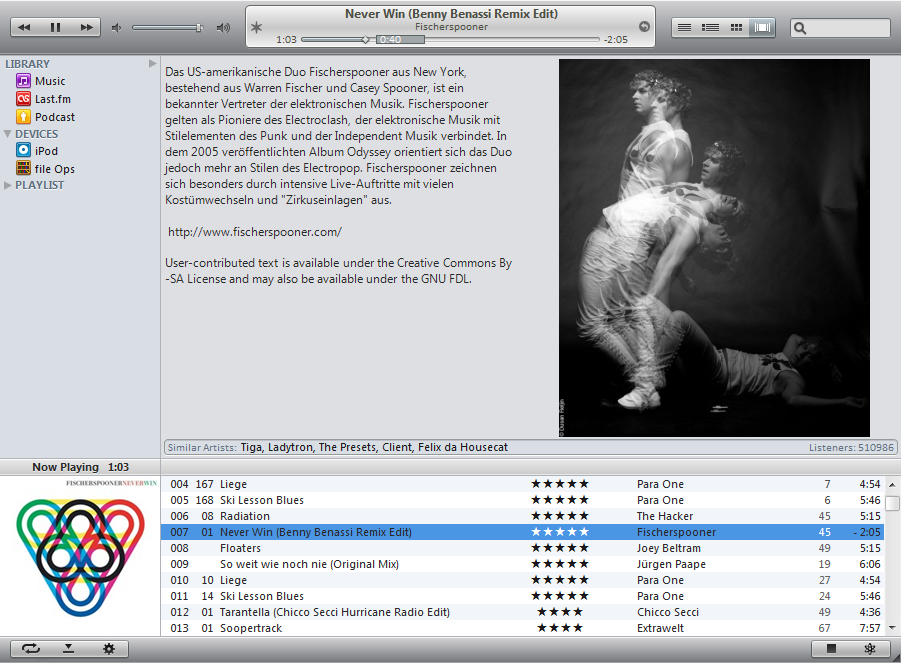
 NUALA V.1 FOR FB2K 1+

Nuala V.1 has the same functions like Silent Night
but without
foo_vis-shpeck.dll
foo_chronoflow.dll
foo_ui_playlist_dropdown.dll
and only one Graphical Browser Pannel
I wanted to make a configuration witch is a litle bit smarter
than Silent Night.
I did not made a new manual for Nuala it is the old
manual from Silent Night but the installation is the same
like it is for silent Night
The MD5 Checksum for the Nuala V1.exe is
3790b3798b6fe98b44010bf6d1b9cd19
If Last.FM doesn't work then try this... link

_______________________________________________
 Components
used components...
Columns UI
EL Playlist
Panel Stack Splitter
WSH Panel Mod
Channel Spectrum panel
Graphical Browser
Biography View
Lyric Show Panel
Quick Search Toolbar
additional components...
Podcatcher
Run services
LastFM Radio
Audioscrobbler
iPod manager
Playback Statistics
CD Art Display Interface
Soundmixer in the
run services pannel by me
Multimedia Keys ...[link]
______________________________________________
 Installing
look the Manual inside the downloadet archive
for the last.fm love button...
1. show the love button. (Nuala preferences pannel)
2. You see the smiling face insted of the button.
3. right klick Configure...
4. Tools - Import
5. import this script: foobar2000\scripts\playcount sync.txt
6. Apply
7. foobar preferences - softplaylist enter Your Last.FM Account Data
8. The same for Last.FM
9. Now You must fill in the acount Data for the last.fm button
- right klick - Set Your Last.FM Username
- right klick - Set Your Last.FM API Key
make sure foobar is not blocked for the internet
______________________________________________
 Thanx 2 ...
extremehunter1972
for the scripting help
ncrow
for the foobar mini icon
five-G
for the iTunes Digital no cover image
Sekkyumu
for the Radio icon
Susumu Yoshida
for the iPhone style sidebar icons
The iTunes genre group on Flickr
for the Genre Pictures
marc2003
for the last.fm playback stats
DaHLiA-7
He made the Nuala Skin for iTunes.
nrossow
He inspired me with his iTunes foobar Skin
iTunes for foobar2000
and he helped me with my config.
tedgo
He helped me with my skripting problems
and he was the first one who
tested it out.
Check out his foobar config...
Dark One and Compact One
Thank's Davi-1 for the resources
Nuala iTunes 10 for Windows
_____________________________________________

DON'T FORGET THE FAV

get the latest fb2k version
CHECK OUT SILENT NIGHT FOR FB2K
CHECK OUT TURBO FOR FB2K
© 2011 - 2024 Arnie77
Comments62
Join the community to add your comment. Already a deviant? Log In

I fucking hate iTunes but the design of it is nice. This is pretty goddamn nice.